Wednesday, September 8, 2010

Magento installation notes

There is a great article here describing what to do to ensure that, once you've installed Magento onto your local host, you can login as admin.

If you do not follow the above instructions, you will find yourself unable to login as admin.

Additionally, this article shows how to configure a test Paypal account with Magento.


ps: Comments and/or links to this article are most welcome!

Friday, September 3, 2010

Chrome August's big winner as Internet Explorer resumes slide

Please note that this article was 'send-to' here from the following Google Reader article
All credit goes to the author, Emil Protalinski.


As browser competition continues to heat up, 2010 looks like the year when the market was repeatedly disrupted. Internet Explorer has not managed to gain share for a third month in a row. Firefox is leveling out while Chrome and Safari continue to grow. Opera? It's hanging on to relevance.


Between July and August, Internet Explorer dropped 0.34 percent, a drop smaller than June's or July's gain. Firefox, meanwhile, went up 0.02 percent, Chrome gained 0.36 percent, Safari was up 0.07, and Opera dipped 0.08 percent.


IE looks stuck around the 60 percent mark for the time being. At least it's still above its lowest point (59.69 percent) with its best chance of market share gains in the short term coming with the IE9 beta, and the back-to-school season.


The importance of being the default browser in the world's most popular operating system continues to help IE. Microsoft browsers are being used by more than 6 out of 10 people and IE8 is being used by more than one in four on the Web (quickly closing in on one in three)—it is now at 27.90 percent (over 30 percent if Compatibility Mode is included). Unfortunately for Web developers everywhere, IE6 continues to be more popular than IE7, though this month it declined more than its successor. IE6's share can be attributed to businesses still using customized intranet applications, and XP's much bigger installed base than Vista's (especially in developing countries).


If we take a look at the last 12 months, the stabilization of IE is really obvious. Firefox, meanwhile, remains far away from what may be the unreachable 25 percent mark, having lost all the share it gained in the last year. Its market share is actually lower than it was a year ago. Chrome's progress is very noticeable in the chart above, though it seems to have found resistance at the 7 percent mark. Safari's gains are at about 1 percentage point, while Opera's are almost insignificant.


As always, things at Ars are very different. There was no place-changing this time: Firefox continues to dominate, Chrome is second, Safari is third, IE is fourth, and Opera brings up the rear. Last month, Firefox gained share, as did Chrome and Opera. The first-party browsers, Safari and IE, both dropped.
Please note that this article was 'send-to' here from the following Google Reader article
All credit goes to the author, jk.


Quickly Make Windows 7 Bootable USB Device


"Making a USB bootable operating system is a good idea if you want to install an operating system in machines that has no optical drive, for example netbooks and ultra-portable laptops.
Moreover, one of the main advantages of a bootable USB disk is, as it is faster than the optical drive, installing your OS requires less time, but, of course, your motherboard should have USB boot support.
Here is a very simple solution to create a bootable USB drive for Windows 7 without any extra expense and DOS technique. The free application called Windows 7 SBB Tool lets you easily create USB bootable windows 7 setup in few steps.
It is very simple to use if you have Windows 7 iso file, just extract the files in any location of your local disk and specify it to SSB Tool. You can choose any removable device (USB drive, SD Card, etc), if your motherboard has support for that.
Download Windows 7 SBB Tool

Wednesday, September 1, 2010

PDFill – Collection of 15 Useful Free PDF Tools, PDF Writer and Image Writer & PDF Editor

Please note that this article was 'send-to' here from the following Google Reader article
All credit goes to the author, Mayur.


pdf PDFill package contains the complete PDFill applications including the FREE PDF Tools, the FREE PDF and Image Writer and evaluation copy of PDFill PDF Editor. Check below about these 3 programs:


1) PDFill PDF Tools -


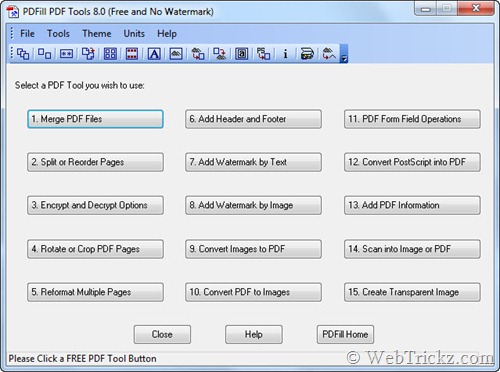
PDFill PDF Tools is a free suite without any Watermarks, which provides the world’s most powerful and useful PDF tools for FREE. It offers many tools for PDFs like Split, Merge, Rotate, Encrypt PDF, Watermark PDF files, add or edit PDF information, etc. All the 15 tools are accessible from one program, making it definitely easy to use.


PDFill PDF Tools_15 Free pdf tools


Following is the list of 15 Tools included in PDFill PDF Tools along with their function:

  • 1. Merge - Merge two or more PDF files into a single PDF file.
  • 2. Split or Reorder – Extract pages from a PDF file into a new file. Reorder the page sequence into a new file.
  • 3. Encrypt and Decrypt with Security Options – Protect PDF files with passwords and prevent PDF files from being printed, copied, changed, filled, extracted, signed, assembled or merged. Supports Adobe Standard 40-bit Encryption and Adobe Advanced 128-bit Encryption.
  • 4. Rotate and Crop – Rotate a PDF page by 0, 90, 180 and 270 degree. Crop a page to modify its layout of Print or View by specifying its margins.
  • 5. Reformat – Put multiple pages into one page to save paper and inks when printing hard copies. Add note lines for handout.
  • 6. Header and Footer – Add Headers and Footers to present information, such as date, time, page numbers, or the title of the document, in the top or bottom margins of a document.
  • 7. Watermark by Stylized Text – Add Stylized Text Stamp.
  • 8. Watermark by Image – Add Stamp using image file (bmp, jpg, gif, png, tiff, and wmf).
  • 9. Convert Images to PDF – Convert images (bmp, jpg, gif, png, tiff, and wmf) into a PDF file with layout options.
  • 10. Convert PDF into images – Save PDF pages into images (png, jpg, bmp, gif, wmf, and tiff) with DPI options.
  • 11. PDF Form Fields: Delete, Flatten, List – Delete, Flatten or List the PDF Form Fields inside a PDF file.
  • 12. Convert PostScript (PS) File into PDF – Covert PS files into PDF files so Adobe Reader can read them.
  • 13. Add Information – Add information (title, author, subject, keywords, created, creator, producer, version) to PDF documents.
  • 14. Free Scanner – Scan your paper form or photo as an image file (PNG, JPG, BMP, TIF, GIF) or a PDF file.
  • 15. Create Transparent Image – Create a transparent image with options to adjust transparency options

2) PDFill PDF Writer and Image Writer (FREE) -
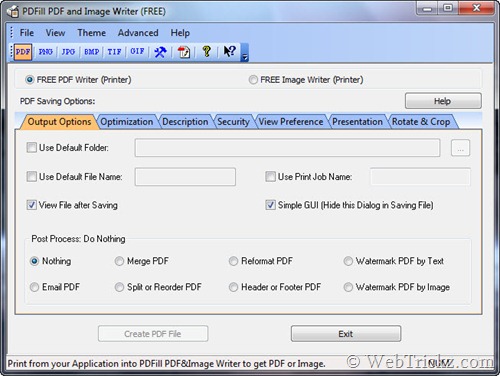
PDF Writer allows you to create highest quality PDF from ANY printable windows application including Microsoft Word, PowerPoint, Excel, Cad, and more. A PDF Button can be added into Microsoft Word, PowerPoint and Excel using the ‘Advanced’ button to save PDF in one click. It also offers numerous PDF saving options.


PDFill PDF and Image Writer


Image Writer is installed as a virtual printer driver which allows to Print your document as an image file (PNG, JPG, BMP, TIF, GIF) with options for resolution, alpha bits, rotation, flip, output, and registry control.


3) PDFill PDF Editor


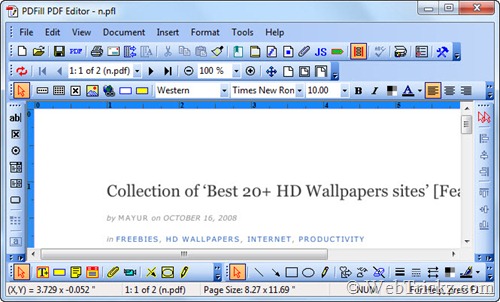
The evaluation copy of PDFill PDF Editor is also included which offers rich and powerful tools to edit a PDF file without requiring Adobe Acrobat. The free evaluation version produces watermark edited PDF files.


PDFill PDF Editor


Download PDFill Package [9.1 MB]

Requires: Free Adobe Reader, GhostScript 8.63 and Sun Java.
Supports: Windows 2000/XP/2003/2008/Vista/Windows 7 (32 & 64 Bit)


[Updated 24dec2013]
4) Online PDF filler http://www.pdffiller.com

Saturday, August 7, 2010

How to turn non-resizeable windows into resizeable

DigiTallis has a neat utility, called REsizeEnable that allows you to convert any non-resizable window into a resizeable one.


Simply download the ZIP file, extract into a dir and run. An icon will appear in the taskbar to let you know the app is running.


Open any window and you will notice that you can now resize it!


ps: Comments and/or links to this article are most welcome!
Enhanced by Zemanta

Tuesday, August 3, 2010

Neat way to address IE6-9 in CSS

Update 29mar2010: Added the \9 bit for IE8 and below
Update 27apr2010: Added note about importance of order
Update 3aug2010: Added '>' for IE7-specific targeting.


I just saw an article by Jeffrey Way on how to address IE6, IE7 and/or IE8 in CSS.
 #someElement {
background: red;              /* modern browsers */
background: green\9;        /* IE 8 and below */
>background: green;         /* IE 7 exclusively */
*background: green;         /* IE 7 and below */
_background: yellow;        /* IE6 exclusively */
}

It is important to note that you need to write your CSS in the correct sequence:


#someElement
{
/* CSS for real browsers goes first */
background: green;        /* IE 8 and below */

/* CSS for Microsoft's shamefull browsers goes next in version descending order */


background: pink\9;        /* IE 8 and below */
>background: red;         /* IE 7 exclusively */
*background: yellow;         /* IE 7 and below */
_background: black;        /* IE6 exclusively */
}

Thanks Jeffrey, that is a neat trick!

ps: Comments and/or links to this article are most welcome!